Showing posts with label photo editing. Show all posts

Thursday, 2 January 2014

Lightzone - free, open source alternative to Lightroom


Lightzone-logo.png


Lightzone is free, open source, software for editing photos. It is similar to Adobe Lightroom. You do have to create a free account on their site, but it is quick and easy. 

Lightzone is available for Windows, Mac, and Linuz. You can edit batches of photos with effects and styles, color masks, and more. It can make it appear as if you took the photo under different lighting conditions, clean up photos and more. 

There are help videos and forums on the site with an active community to help you use it. 


Friday, 21 December 2012

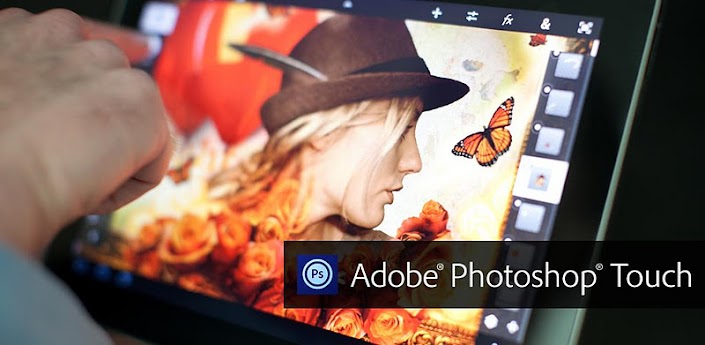
Adobe Photoshop Touch Updated for 7 Inch Devices


Adobe® Photoshop® Touch

Adobe Photoshop Touch is a great app for tablets and smartphones that I wrote about before. It has just been updated for 7 inch devices like the Nexus 7, Kindle Fire and iPad mini.

This is a great app for students and educators to use for photo editing and effects and now it is available for the smaller tablets. I happen to love my Nexus 7 and the 7 inch table size, so I'm very happy. The app is $9.99.


Take a look at more information about Adobe Photoshop Touch.


Evernote Skitch meeets Windows to create a great, easy to use screen capture and image editing service.


skitch screen capture
Evernote, the app I talk about way too much, has some other great apps that work with it. Skitch is one of them. Skitch is a free image editing and screen capture app that has been on mobile devices for a while and is now, finally, on Windows.

It is easy to use, has enough features for most users, and is free. Hard to beat that. You can use it to take screen captures, annotate images, and it integrates with Evernote.

Teachers can use it to capture and annotate images for students, professional development, e-portfolios, etc. and students can use it for class projects.

It is available for iOS, Android, Mac, Windows, and Windows 8.

Learn more at the source page below.

Source: Evernote Skitch website


Monday, 1 October 2012

Enthread - quick, easy, free web based imaging editor


Enthread is a web based image editor that has some easy to use, simple editing features. Simply drag your image to the center of the page and get started.

Adjustments include: Hue/Saturation/Lightness, Brightness and Contrast, Colors (RGB), Filters (sharpen and blur), and Process (Sepia, Desaturate, Solarize, Invert, and Edges). You can undo any edit you make, as well as save and share the finished product.

That is literally it. Easy to use, online, and simple. Great for basic edits and adjustments.


Related:

Great, free Image editing sites and software

Two More Free Image Editing Resources

PicMonkey - free online photo editing


Monday, 30 July 2012

Splashup - free online image editing


Welcome to Splashup.com

Splashup is a free online image editor that I learned about from a fellow webOS fan, Aaron Gallo, on his blog, Novacharter.

It is easy to use and even let's you "jump right in" and edit photos and images without needing an account. The controls and commands are similar to many other image editing apps so it's easy to get started. It's all online so there is nothing to download or install. It has a lot of great features and there is a light version with less features that is simpler to use. 


Splashup Editor

You can save your work or share it online with different services like Facebook.


It's another great image editing tool for teachers and students.


Related:

Great, free Image editing sites and software

Two Free Graphic creation and editing software

PicMonkey - free online photo editing

Two More Free Image Editing Resources


Thursday, 14 June 2012

Aviary launches free mobile app photo editor for iOS & Android


Aviary Photo Editor

Aviary is a great resource that I use constantly. I use the Falcon and Talon online image editors to grab images from the web and edit/crop/add effects to use with my blog and with lesson materials. There are browser extensions to use with the online apps and it's very powerful.

A while back, Aviary launched an add-on for mobile devices that allowed you to use Aviary within mobile apps. Yesterday they announced that Aviary is now available as a free, stand-alone mobile app for iOS and Android.


The Aviary mobile app is free and features an easy-to-use, intuitive interface with effects, stickers, color balance, crop and rotate, brightness, contrast, saturation, drawing, text, cosmetic tools and more. There are more effects available for purchase in effects packages ($0.99) and more effects and tools are being added. 

This is a great mobile tool that can be used for photo editing and effects on iOS and Android devices by teachers, students, bloggers, and for personal use, greatly increasing the abilities of your device. I now have the ability to do more of my work on my mobile device using this app. I was using it last night to edit some photos that I'm using in a project and it was very easy to use. 


 Try it out for yourself:


Related:

Aviary Falcon - online image markup

Aviary Education - safe environment for Aviary for Students
Aviary for Facebook Released - image editing app right in Facebook
Aviary Photo Editor now available to Flickr users-replacing Picnik
PicMonkey - free online photo editing (from some of the same people who made Picnik)

Great, free Image editing sites and software

Two More Free Image Editing Resources


Friday, 1 June 2012

Cloudinary - host and edit images online for free


cloudinary logo - transparent (500px)

Cloudinary is a site that provides image hosting and editing/formatting. The free version has great features and is all most people would need.

Cloudinary lets you use a custom URL to format and edit your images online. You upload your image and then access them using the special URL based on the formatting you want. The original photo stays online and you can request different formats based on your needs. You can even automatically combine multiple images into one.


This makes it very easy to manipulate and use images in your websites or blogs.

The free version has 95% of the features the paid versions do. The main difference is limits. The free version limits you to 500MB of storage, 50,000 images, and 1,000 MB of monthly bandwith. That's a lot for most users.

Check it out and see how it will work for you. http://cloudinary.com


Related:

Great, free Image editing sites and software

Two More Free Image Editing Resources


Thursday, 10 May 2012

Pinta - free image editing and drawing software


Pinta is a free image editing and drawing app for Windows, Linux and Mac. It's modeled after Paint.NET and is very easy and simple to use. It has some great features and functions.

It features drawing tools, unlimited layers, multiple languages, adjustments and effects and more.


It's a great drawing and graphics editing software.

Check it out: http://pinta-project.com/


Related:

Great, free Image editing sites and software

Two Free Graphic creation and editing software

PicMonkey - free online photo editing

Two More Free Image Editing Resources


Monday, 7 May 2012

Kodak Gallery shutting down July 2nd - Shutterfly buying it


I wrote about Kodak Gallery back in February (online photo service that allows you to upload, share, and view your photos from anywhere) and then updated in March that it was up for sale and now it is official that Kodak Gallery is being shut down and be bought by Shutterfly. Kodak Gallery had just announced their mobile apps too.

Shutterfly is an online photo service and social sharing network that allows unlimited images at no cost and at full resolution. Photo Books are their flagship product, which allows people to create photo books with covers, templates and designs.

Kodak Gallery is scheduled to shut down July 2nd and Shutterfly will be buying the business.


On a side note, Kodak Gallery is accessible from school, Shutterfly is blocked as a "shopping site." Thank goodness for 3G on my Chromebook so I could check out Shutterfly.


Here are some more online photo gallery and photo editing services.

PicMonkey - free online photo editing

Great, free Image editing sites and software

Two More Free Image Editing Resources

Smilebox Slideshow - free software to create slideshows of your photos


Wednesday, 25 April 2012

Adobe Photoshop Touch Review - very nice app


Adobe Touch Apps family

Adobe recently released a host of Adobe TouchApps - Photoshop Touch, Ideas, Collage, Debut, Kuler, Proto, and Carousel. Design, edit, and elegantly present your work using six new Adobe® Touch Apps designed for your tablet. Whether you use a stylus or just your fingertip, intuitive touchscreen features provide easy, precise control for a variety of creative tasks. Transfer files through Adobe Creative Cloud for refinement in Adobe Creative Suite® software — or to view, access, and share from almost anywhere.

I have been using Adobe Photoshop Touch for the last couple of weeks on a loaned iPad and a friend has it on his Android tablet. The Photoshop Touch app lets you quickly combine images, apply professional effects, share the results with friends and family through social networking sites like Facebook, and more. If you have used Photoshop, the Touch app will be a breeze for you. If you haven't used Photoshop, don't worry, the Touch app is easy to use, has interactive tutorials, and there are tons of help resources on Adobe's site and for educators on the Adobe Education Exchange, which is a resource site for educators who use Adobe products. Tips, instruction guides, videos, a community of users, lesson examples and much more are all available to help teachers and students using Adobe products.


Adobe's new Creative Cloud/Suite 6 for Students and Educators integrates the Photoshop Touch app so that you can work on your projects seamlessly from mobile to desktop. 


The Photoshop Touch app was very easy to learn and get started with. I did use some of the tutorials, and had read a few posts on the education exchange site, but it was very intuitive. Features include layers, effects, filters, tone and edge editing, text, search for images, share images, wireless printing, and much more. The tools are all, literally at your fingertips on the app. Because it's not the full version of Photoshop, it's easier to find the tools that you use the most. It is probably the best image editing app for tablets around and still has all the really important and useful features from the full version of Photoshop. It's easy to bring in an image, edit and manipulate it, and the save it. It's only $9.99, which is super cheap for Photoshop and the Education Volume app store has it for $4.99, which makes it very affordable for education.

Adobe-photoshop-touch-ipad-review-7

I had some fun playing with different pictures I took with the iPad, although the quality of them wasn't great using the iPad's camera, so I also brought in some other pictures and graphics files to play with. It was very easy to clean up images and there is even a gallery of styles and effects that you can look at and then see a step-by-step tutorial on how to achieve those effects.

This is a great app for education. It's inexpensive, easy to use, full featured, and a tool that students should learn to use as it will help them in college and careers.

Here are some screenshots from Adobe's site:
pstouch-1-295x221
pstouch-2-295x221

pstouch-3-295x221

pstouch-5-295x221


Adobe Announces Creative Cloud/Suite 6 for Students and Educators
Link to Photoshop Touch page on Adobe's site: http://www.adobe.com/products/photoshop-touch.html

Original Announcement of app: Adobe PhotoShop Touch for iPad2 now available
Photoshop Touch for iOS. $9.99 


Photoshop Touch for Android. $9.99 


DISCLAIMER: I received a free copy of the Adobe Photoshop Touch app to do this review. I have been using it, and the Adobe Education Exchange, as part of this review.