Monday, 4 June 2012

Great, free Educational Games from NOAA about oceans and air


NOAA, the National Oceanic and Atmospheric Administration, has some great, free, educational games that teachers can use with their students.

There are over 25 different games and interactive activities that cover topics about water, air, the oceans, environmental issues and ocean life. Many of the games and activities are hosted on other sites, but gathered here for easy access


WaterLife: Where Rivers Meet the Sea is a game based on the ecosystem of a United States west coast estuary. It helps students learn about estuaries, food webs, and why estuaries are essential to ocean life and to humans.

This is a great way to have students learn about the oceans, air, and the environment while having fun playing a game.


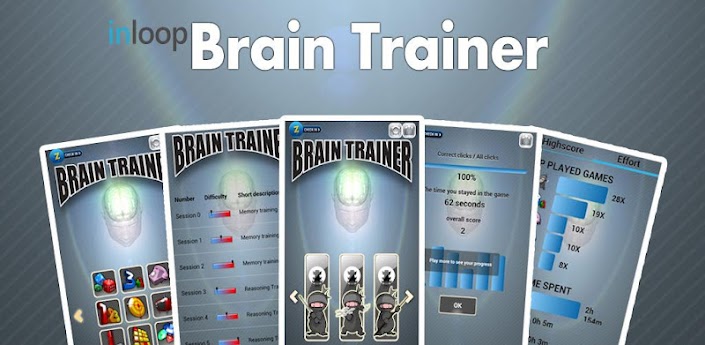
Brain Trainer app for Android helps you give your brain a workout


Brain Trainer app for Android is a free (full version for $0.99) app that has games to help you improve your memory and give your brain a workout.

There are games on math, letter and number sequences, picture memory games, shapes, colors, sudoku and puzzles.

This is a great app that can be used for fun or to help improve memory and thinking skills.


Brain Trainer Free

Any.do to-do list app available on Android, & now iPhone and Chrome browser


Any.do is a very popular, free to-do list app for Android and it has just been released for iPhone and the Chrome browser. It is simple to use and navigate and you can organize your tasks by date or folder and sort them by dragging and dropping them. It includes gesture based features (similar to webOS) and you can mark tasks as high priority.

The Android and iOS versions are very similar to each other with the Chrome version having less features, but still very useful. It resides on the address bar and opens on top of the current window instead of in a new tap. It can also open into it's own always-open window.


What's nice about Any.do is that your task list is synced across all of the versions, from the Chrome app to the Android and iOS versions so you can access your task list from any device.

This is a great app for students, teachers and administrators to use to keep organized.


Related:

10 Great, Free Apps for Students for Notetaking and Class Planning

Evernote - notetaking, web clipping, and more, on any device

Comparison of some popular note taking apps

Getting Students and Teachers Organized - tips and resources


EdmodoCon 2012 - free online educational conference Aug 8th


EdmodoCon 2012

EdumodoCon is a free, online professional development conference being held on Wednesday, August 8th, 2012. Throughout the day, teachers will share ways they are using Edmodo and other digital tools in the classroom. It is scheduled for 10:00am - 9:00pm ET (GMT -5).

If you are interested in presenting, go to the Call for Presenters site.

You can register for the conference, for free, here.

Edmodo is a great resource for teachers and students, providing a secure social learning network for classes. Teachers can host online discussions, share resources, and assign work to students.


Related:

22 Great Tips on using Edmodo in the classroom

5 Great course management resources for educators

Which Social Network should you use? Infographic on which to use when.

Some more great Android Apps for Education (including Edmodo app)


Saturday, 2 June 2012

Most Read Posts from Past Week on Ed Tech Guy


Seniors are done. They have completed their final projects (rockets) and their final exams. Next stop, graduation practice and then graduation.

Next week we have some new silly standardized testing the district came up with for grades 3-11 and then the following week are final exams for grades 9-11.

Here are the most read posts from the past week: And don't forget to check the posts on Friday.They don't always have time to become the most read, but there are usually some good ones there (and of course  check out all of the articles on the site). Peruse some of the older ones also.


1. The Death of Worksheets 

2. NearPod - create and share lessons on iPads in classroom - free

3. Chalkable - educational apps and classroom management system

4. Embedit - embed any file in your website or blog - free

5. 10 Tech Skills Every Student Should Have

6. Social Media in Education - connect, share, learn, communicate and more

7. CyQuiz - create your own quizzes and games for free

8. EdCamp CT is Aug 10th. I'm going. Are you? You should be!

9. New Chromebook, Chromebox and updated Chrome OS - look awesome, great for education


Don't forget to check out the permanent pages at the top of the site too!


I am also available to speak at your school or conference and to facilitate professional development sessions.  I will work with you and your staff to tailor a training plan that works for you.


Please visit the advertisers on this site. 


If you are reading this blog and like it, please consider subscribing to it. The subscription links are on the right side of the blog, down just a bit (below the ads). 


You can subscribe using an RSS feed reader or via emails.


RSS feeds go out immediately and email subscriptions go out once a day.


If you subscribe by email, make sure you click on the link in the confirmation email.


You can also follow me on Twitter and Google+.


Please share this site with your colleagues.


Friday, 1 June 2012

Google World Wonders Project - bring the wonders of the world to life


Google, one of my favorite resources for education with tons of great apps and resources, has another great resource for education.

Google World Wonders Project takes images from Google Street View and make great places of the world, from Pompeii to the Hiroshima Peace Memorial, available to anyone. Users can explore and navigate the area, including places not easily accessible. There are also 3D models, YouTube videos and photos of these historic sites. You can browse by topic or by your location.


Teachers can bring students on virtual field trips to some wonderful places on our great planet.  The Education page has teacher guides (free PDF download) for primary and secondary school, along with historic sites organized by class and topic.

I was playing with it for a while today and thought it was a great way to explore some pretty cool places around the world

It is a great way to teach, and learn about, historical sites, history, and geography.
http://www.google.com/culturalinstitute/worldwonders/


Related:

Why I Use Google's Products as an Educator
Google for Education Resources

Google for Educators

Tons of great, free resources from Google


Cloudinary - host and edit images online for free


cloudinary logo - transparent (500px)

Cloudinary is a site that provides image hosting and editing/formatting. The free version has great features and is all most people would need.

Cloudinary lets you use a custom URL to format and edit your images online. You upload your image and then access them using the special URL based on the formatting you want. The original photo stays online and you can request different formats based on your needs. You can even automatically combine multiple images into one.


This makes it very easy to manipulate and use images in your websites or blogs.

The free version has 95% of the features the paid versions do. The main difference is limits. The free version limits you to 500MB of storage, 50,000 images, and 1,000 MB of monthly bandwith. That's a lot for most users.

Check it out and see how it will work for you. http://cloudinary.com


Related:

Great, free Image editing sites and software

Two More Free Image Editing Resources